
Prototypr.ai MCP
Easily search and export designs from your workspace and community marketplace with MCP. Access all your design assets through natural language queries.
Explore prototypr.ai's featured MCP servers that are ready to enhance your AI's capabilities
Easily search and export designs from your workspace and community marketplace with MCP. Access all your design assets through natural language queries.

A custom Google Analytics 4 Agent as an MCP server. Powered by a fine tuned GPT Model and the Google Analytics API.

An Open Source Google BigQuery MCP server that enables teams to explore their BigQuery datasets and run SQL queries using natural language.

An Open Source Google Search Console MCP server that enables you to query the GSC API with natural language and get insights into the performance of your SEO initiatives.

An Open Source Sendgrid MCP server that enables you to save HTML templates to Sendgrid, pull a list of templates, and get statistics about the performance of your email marketing program.

An Open Source WordPress MCP server that enables teams to deploy web pages created in prototypr.ai Studio in addition to importing image assets to remix with Nano Banana.

An Open Source Scheduling MCP server that enables data teams to schedule and manage cron jobs with natural language. Built on top of the Google Cloud Scheduler API.

An Open Source Reporting MCP server powered by the Stripe API.

An Open Source Forecasting MCP server powered by Meta's Prophet library.
prototypr.ai builds open mcp tools for product teams, ai agents and your workflows. Simple to install on your own infrastructure. Proudly Open Source.
MCP USE CASES
See how verified MCP servers connect AI to live data, reporting, publishing platforms, and recurring workflows.
1. DATA ANALYSIS
Connect AI to Google Analytics, Google Search Console, BigQuery, Stripe, and SendGrid. Ask natural-language questions about your performance without manually navigating reports or writing queries.
Example Search Console MCP Prompt
Please pull top 50 queries for landing pages containing /products over the past 28 days and display the results as a table.
Open source and ready to deploy on infrastructure you control.
2. LIFECYCLE REPORTING
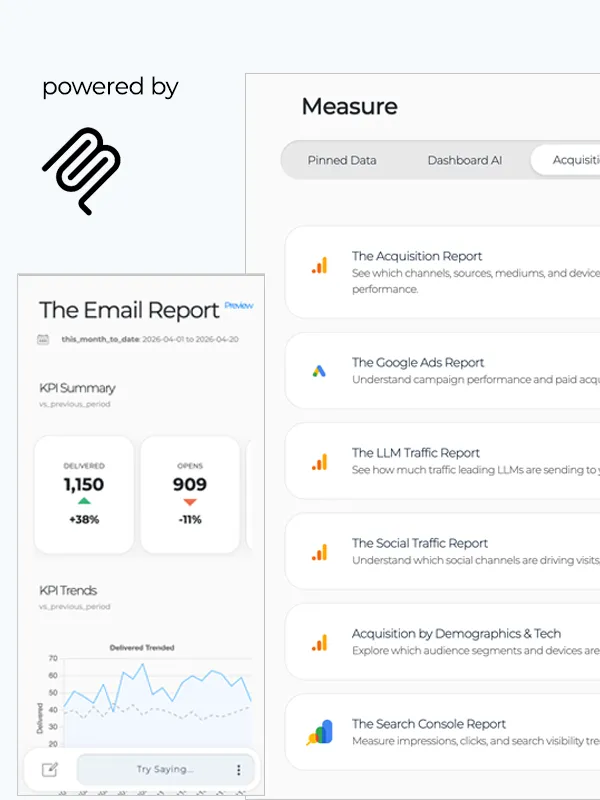
Prototypr.ai has open sourced and verified a number of MCP servers that power reporting inside the platform. Explore your product data across acquisition, engagement, retention, and monetization in one intuitive reporting workspace.
Summarize Lifecycle Reporting Prompt
Please summarize this dashboard as if it were an email to marketing. Focus on understanding performance across acquisition, engagement, retention, and monetization. Surface insights around the most important changes, explain why they matter, and identify opportunities I should investigate next.
Connect your data and explore reports with an AI Product Analytics Advisor.
3. CONTENT CREATION & PUBLISHING
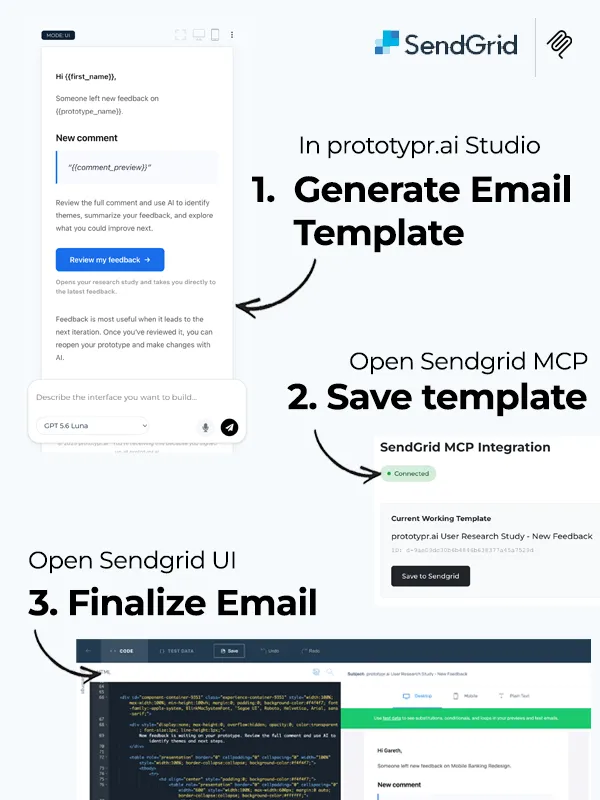
Connect Prototypr.ai Studio to the tools where your content goes live. Generate responsive email templates and save them to SendGrid for final editing, or publish approved landing pages and image assets directly to WordPress with our open source MCP tools.
Example Content Publishing Prompt
Create a minimalist, clean transactional Sendgrid email with a soft gray background and a white centered card. Use a modern sans-serif font, plenty of white space, and a light blue accent box for key features. Include a primary bold blue CTA button with a right arrow and a secondary outlined white button. Tone: professional, simple, and encouraging. Styling must be inline and compatible with Sendgrid.
4. WORKFLOW AUTOMATION
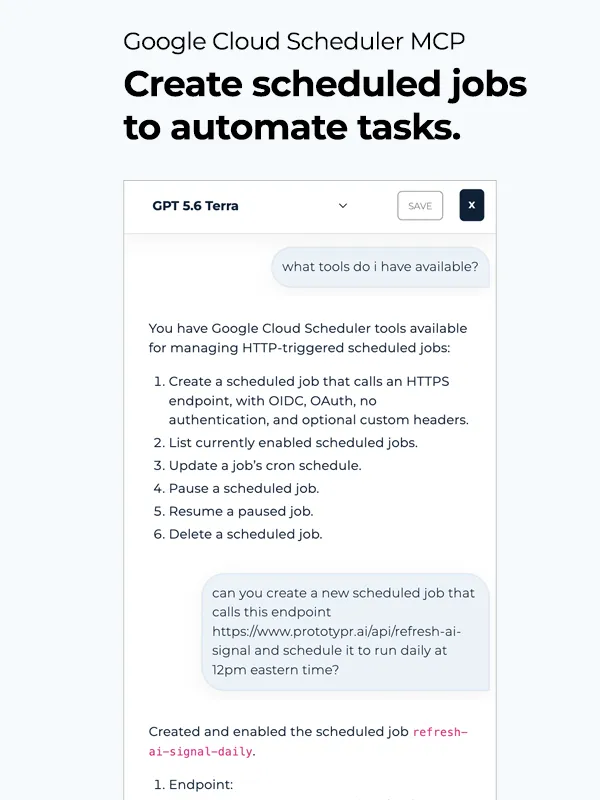
Use the Google Cloud Scheduler MCP to create, update, pause, and manage recurring jobs without manually configuring cron schedules. Trigger reporting, lifecycle messaging, data processing, or other endpoint-based workflows on a reliable schedule.
Example Workflow Automation Prompt
Please create a new scheduled job that calls this endpoint https://www.yourdomain.ai/api/recurring-task and schedule it to run daily at 12pm eastern time?
Open source and built on the Google Cloud Scheduler API.
"MCP has been a game changer for me. Having easy access to all of my data sources in one place brings a level of accessibility I've never had before. Not only that, MCP also provides a level of flexibility where I can create my own content publishing workflows on top of the same service I use to pull data. What a protocol!"


HOW TO INSTALL AN MCP SERVER
Get started connecting verified mcp tools to prototypr.ai in a few easy steps.
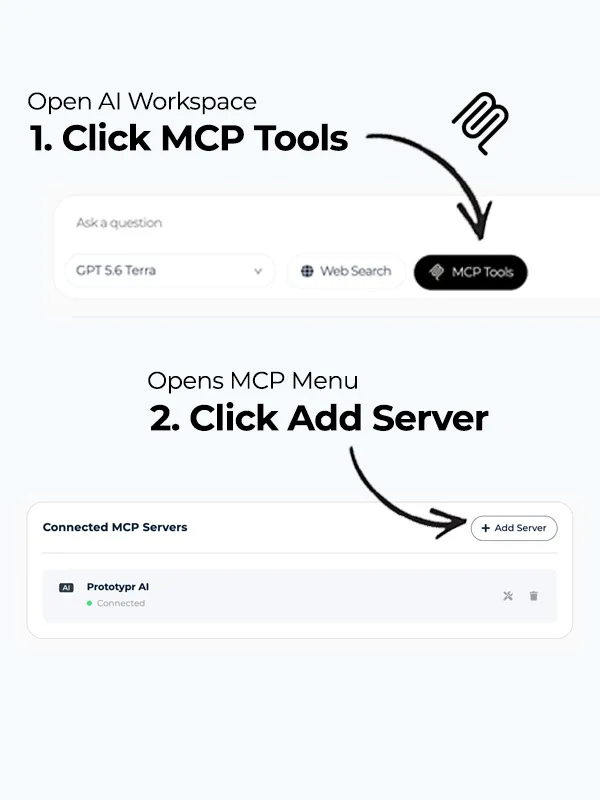
1. OPEN YOUR AI WORKSPACE
Your AI Workspace is where you manage all of your MCP data sources. Add a new server, delete an existing one or simply view tools for one you've already added to your toolbelt.
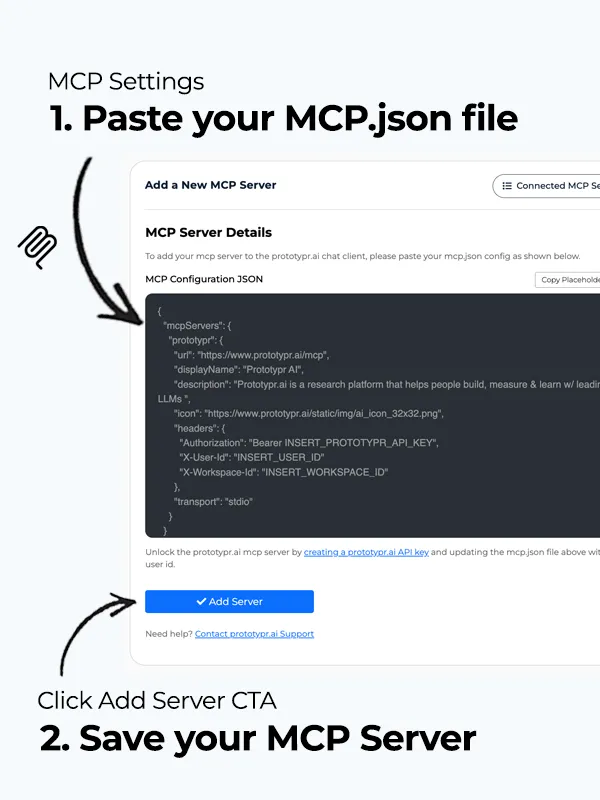
2. ADD MCP.JSON
Your MCP.json file consists of a endpoint to your mcp server alongside any authentication headers and descriptions.
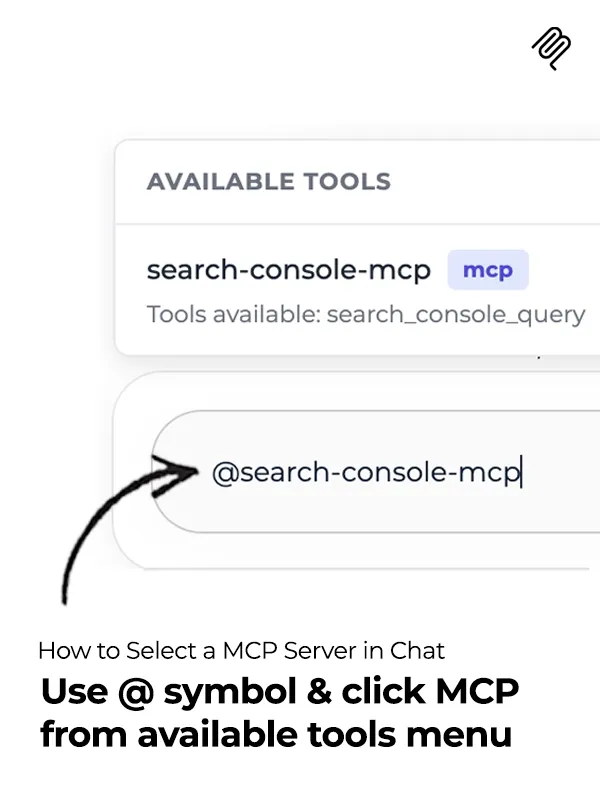
3. CHAT WITH MCP
To chat with your MCP server, simply use the @ symbol at the start of your sentence, then select the tool from the available tools menu. Alternatively, you can click on a server when you open up MCP Tools from your AI Workspace.
Try MCP Tools in prototypr.ai
Get started with building a simple MCP server that can act as a bridge between systems. Create a pure python MCP server built on top of Flask and learn how you can modify it for your own purposes. Code included.
Read How to Build a MCP ServerMake your data more accessible to your product teams, agents and stakeholders. Add your MCP server today.
Everything you need to know about MCP
Integrating MCP into your application and workflows offers key benefits:
Less Context Switching: MCP users can tay in their workflow while AI connects to tools in the background.
Ease of Integration: MCP is an open standard that simplifies connecting AI agents to your existing tools, APIs, or databases.
Enables New Distribution Channels: MCP enables your service to reach more users across AI platforms that are MCP compatible.
Cross-Tool Compatibility: Works consistently across platforms like Claude, Cursor, OpenAI’s Responses API and prototypr.ai.
Open Source: MCP is built on open standards, fosters transparency, collaboration, and community‑driven innovation. MCP allows anyone to build compatible tools without licensing barriers.
MCP tackles the core limitations of current AI integrations and directly addresses:
Disconnected data: Traditional LLMs can’t access live business systems. MCP fixes that by standardizing how models access data and services
Integration inefficiency: Instead of hardcoding multiple APIs into each AI app, MCP provides a universal interface
Security risks: You define and authenticate exactly which tools/models can exchange data through your MCP server
Maintenance overhead: Extending functionality no longer means rewriting APIs. WIth MCP, new capabilities can be added in a modular fashion
APIs expose “endpoints” that people can hit and receive a deterministic response. MCP exposes capabilities (ie. tools, resources, and prompts) that assistants can discover, understand, and then use as part of a larger workflow. Your app doesn’t just answer a question once, but actively participates in a conversation managed by the assistant, across multiple steps and contexts.
Source: How to Build a MCP Server - A Practical Guide for Developers - prototypr.ai
MCP supports multiple authentication methods including OAuth 2.0, API keys, and mutual TLS. A good resource to read is OpenAI's Responses API documentation, which details how developers can handle authentication with an MCP server.
An MCP Server acts as a bridge between your data and your AI model, exposing your application's functionality as 'tools' that AI Agents can discover and use. It translates your APIs, data, or functions into MCP-compliant services that any compatible client (like Claude, Cursor, OpenAI or prototypr.ai) can use via natural language requests.
MCP Clients are AI interfaces that can connect to MCP Servers to access external data or actions securely. They interpret natural language into MCP requests.
Some examples of MCP Clients include: Anthropic’s Claude, OpenAI’s Responses API, and the one in the prototypr.ai AI Workspace, all of which can request live information using the MCP standard.
In order to connect an MCP Client to an MCP server, you need to pass in credentials to grant access. This typically involves adding a mcp.json file or object to the client, which in the case of the prototypr.ai MCP client looks like:
// mcp.json example
{
  "mcpServers": {
    "prototypr": {
      "url": "https://www.prototypr.ai/mcp",
      "displayName": "Prototypr AI",
      "description": "Prototypr AI is a research platform that helps people build, measure and learn faster with leading LLMs.",
      "icon": "https://www.prototypr.ai/static/img/ai_icon_32x32.png",
      "headers": {
        "Authorization": "Bearer API_KEY"
      },
      "transport": "stdio"
    }
  }
}
Since the prototypr.ai MCP server requires authentication, you would need to generate an API Key from within the platform.