Start Building Surveys with AI Today
Start collecting feedback from your customers and accelerate time to insights with AI Surveys.
AI SURVEY GENERATOR FOR PRODUCT RESEARCH
Generate, edit, and publish your first survey without code
Watch how a simple research prompt becomes a live survey you can share with customers and being analyzing results with AI.
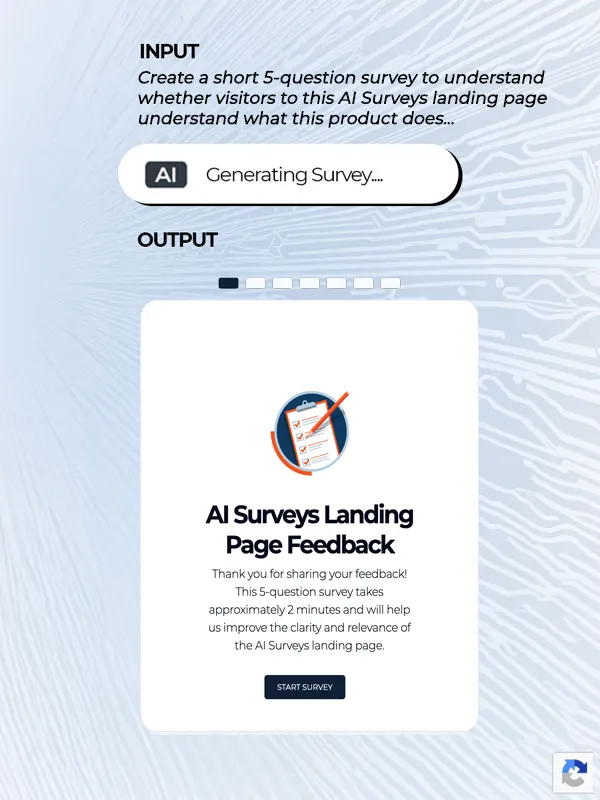
1. Generate a focused survey with AI
Describe what you want to learn about your product, prototype, or customer experience. AI turns your research goal into a concise survey with relevant questions and response formats in seconds.
Example AI Survey Prompt
Create a short 5-question survey to understand whether visitors to this AI Surveys landing page understand what the product does, find the messaging relevant, and know what action to take next. Include a mix of rating, multiple-choice, and open-ended questions.
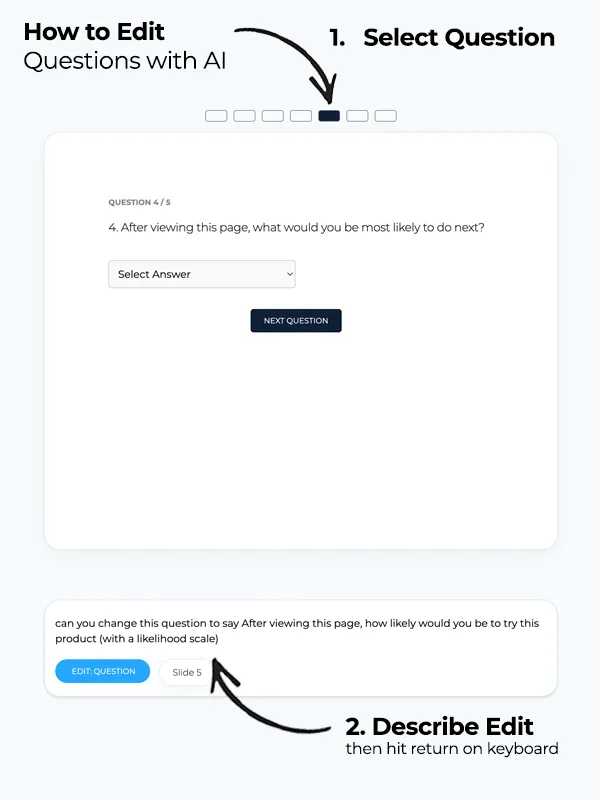
2. Edit Surveys with AI
In plain language, simply ask AI to rewrite unclear questions, change response scales, or turn structured questions into open-ended prompts.
Example AI Survey Edit Prompt
Can you change this question to say After viewing this page, how likely would you be to try this product (with a likelihood scale)
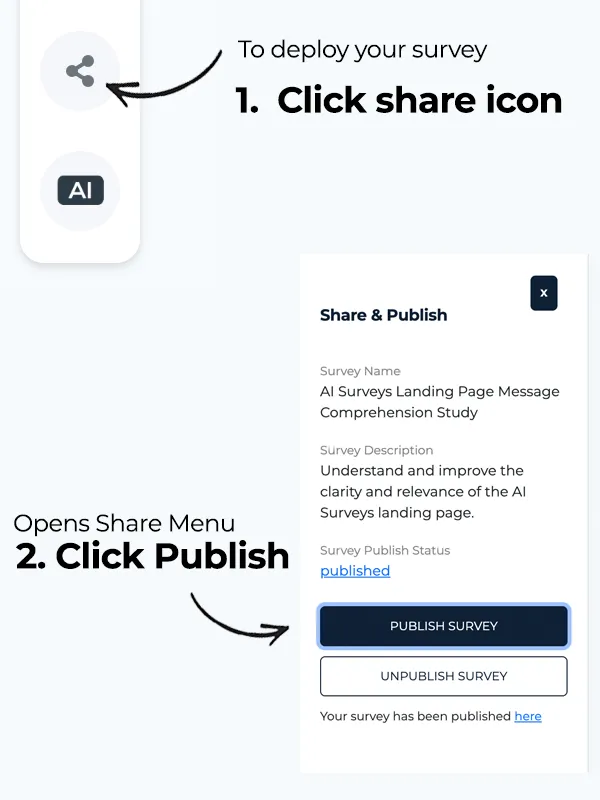
3. Deploy your survey live
Publish your survey to a shareable link and send it to customers, teammates, or research participants and start collecting the data you need to improve your product.
Deploy your survey live today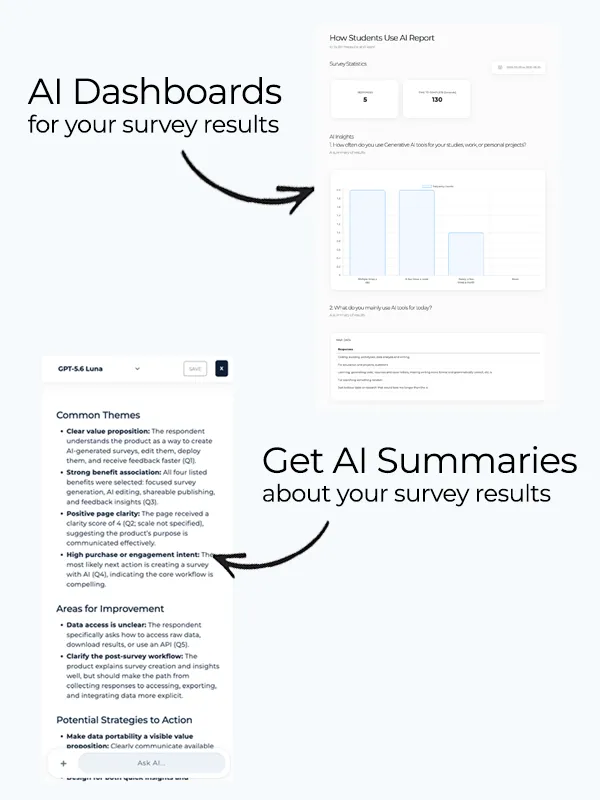
4. Analyze Feedback with AI
Explore responses through an easy-to-understand dashboard with question-level visualizations and an AI-generated summary of the survey. Use AI Chat to investigate patterns, summarize open-ended feedback, and ask follow-up questions about what your participants said.
Example AI Survey Analysis Prompt
Can you help me understand visitor sentiment towards this AI Surveys product by analyzing my open ends?
Create NPS surveys, collect prototype feedback, validate product ideas, and learn what customers need throughout the product development process. With how-to prompt examples for each use case.
Measure customer loyalty with a Net Promoter Score question and learn why customers would—or would not—recommend your product.
Create a short NPS survey that asks customers how likely they are to recommend our product on a scale from 0 to 10. Include relevant follow-up questions to understand the reason for their score and what would most improve their experience.
Learn whether users understand your prototype, can complete its primary task, and encounter usability issues before development.
Create a 5-question prototype feedback survey to understand whether users recognize the purpose of this experience, can complete its primary task, and find any parts confusing.
Evaluate whether visitors understand your positioning, recognize the product's value, and know what action to take next.
Create a 5-question product messaging survey to learn whether visitors understand what this product does, who it is for, what value it provides, and what action they should take next.
Test customer needs, assumptions, and demand before committing significant time and resources to development.
Create a 5-question concept validation survey to understand whether this problem matters to potential customers, how they solve it today, and whether they would consider using the proposed product.
Discover confusing steps, unmet expectations, and moments that prevent new users from reaching value.
Create a 5-question onboarding feedback survey to identify confusing steps, understand whether users reached their intended outcome, and learn what would have made getting started easier.
Understand which customer problems, features, and opportunities should influence what your team improves next.
Create a 5-question product prioritization survey to understand customers' most important problems, which improvements they value most, and why those improvements matter to them.
Survey Data API
Access survey responses through the prototypr.ai API and bring customer feedback into your data warehouse, internal applications, reporting workflows, or AI agents.
import requests
import os
import json

url = "https://www.prototypr.ai/api/v1/research/get-survey-data"

payload = {
    "user_id": "your_user_id",
    "workspace_id": "your_workspace_id",
    "survey_id": "your_survey_id"
}

headers = {
    "Authorization": "Bearer " + os.getenv("API_KEY"),
    "Content-Type": "application/json",
    "Accept": "application/json"
}

response = requests.post(
    url,
    data=json.dumps(payload),
    headers=headers
)

print(response.json())
Start collecting feedback from your customers and accelerate time to insights with AI Surveys.
Learn how to create, publish, analyze, and export product survey data with prototypr.ai.
An AI survey generator is a tool that turns a research goal, typically written as a prompt, into a structured questionnaire. Based on the prompt provided, it can draft relevant questions and select appropriate response formats, such as multiple choice, rating scales, or open-ended questions, which you can then review and edit. These no-code tools are often part of a broader research platform where you can publish surveys, collect responses, and analyze results with AI.
Common use cases include creating NPS surveys, validating product concepts, testing product messaging, collecting onboarding feedback, and prioritizing features or product improvements.
With prototypr.ai, you can generate a focused survey in less than 30 seconds, refine questions using natural-language prompts, publish the survey to a shareable link, and explore responses through visual reporting, AI-generated summaries, and AI Chat.
To generate a survey with AI, open an AI survey generator such as prototypr.ai Surveys and describe your research goal using a natural-language prompt. Include what you want to learn, who the survey is for, and any question or response formats you would like to use. If you have an HTML prototype or relevant product copy, you can also include it to give the AI additional context. The AI survey generator will use this information to create a structured questionnaire that you can review and edit.
For example, you could ask: “Create a five-question survey to understand whether visitors understand our product messaging, recognize the value of the product, and know what action to take next.”
With prototypr.ai, you can generate a focused survey in less than 30 seconds and refine individual questions with additional prompts. Once you are satisfied with the questionnaire, you can publish it to a shareable link and begin collecting responses.
The primary benefit of using an AI survey generator is speed. Instead of manually brainstorming, writing, and formatting every question, you can describe your research goal in a short prompt and generate a structured survey in seconds. This helps teams move more quickly from a research question to collecting customer feedback and, ultimately, finding an answer.
Other benefits of using an AI survey generator include:
Customer feedback can inform a product roadmap by revealing recurring problems, unmet needs, and opportunities for improvement. Product managers typically organize feedback into themes, assess how frequently each issue appears, and evaluate those findings alongside product analytics and business priorities.
However, feedback should not automatically become a feature. Instead, it should help teams identify the underlying customer problem and develop a hypothesis about how the product could solve it. Teams can then prioritize the opportunity based on expected customer value, business impact, supporting evidence, and development effort.
In prototypr.ai, insights from AI Surveys can be added to Test Center, our AI product analytics dashboard. Test Center brings customer feedback together with Google Analytics data and a library of previous experiments, giving product teams more context for developing hypotheses. Teams can then define a hypothesis, choose a success metric, and run an A/B test or another type of experiment to determine whether a proposed change improves the customer experience.
The results provide evidence for deciding whether an opportunity should be added to the roadmap, refined, or deprioritized. This creates a clear learning loop: collect feedback, identify opportunities, test hypotheses, and use evidence to guide the product roadmap.
In AI Surveys, once you generate a full survey, the app goes into "question editing" mode. Here you just need to navigate through the questionnaire by either pressing the next question cta or with the links at the top of the questionnaire.
Once you have settled on a question to edit, simply type in your edit and hit return. An edit could be something as simple as "turn this question into an open ended question."
Yes. You can use the survey data api to access all of your responses programmatically. More details are available in our API documentation.
Yes. Authorized AI agents can access structured survey data and responses through the prototypr.ai API. This data allows agents to summarize feedback, identify recurring themes, and combine customer research with other product or business context.
When connecting an agent, keep your API token secure and only grant access to the data and actions the agent requires. Never place a token in a public prompt, client-side code, shared repository, skill or other publicly accessible location. You should also rotate or revoke the token if you believe it has been exposed.
AI Surveys is currently available free to try with various usage quotas. Usage limits vary by membership level, so please review your plan in your /profile page to understand how much quota you have to generate and analyze your survey data.