
Experiment Toolkit MCP
The Experiments Toolkit MCP connects your AI client to experiment planning, workspace records, and a shared community experiment library. Use it to research relevant examples, create structured test plans, update findings, and submit completed experiments for community learning.
Table of Contents
Connect the Experiments Toolkit MCP to your AI client and start researching, planning, and managing experiments.
Available Tools & Use Cases
The Experiments Toolkit MCP exposes six tools:
-
create_experiment_planGenerate a structured experiment plan using your request and a summary of the conversation. The tool saves the plan in prototypr.ai and returns a link.
Required inputs:
user_query,conversation_summary. -
list_experiments_by_idRetrieve a list of experiments and their IDs for an authorized workspace. Use this to find the correct record before requesting details or making changes.
Required input:
user_query. -
get_experiment_data_by_experiment_idRetrieve data for a specific experiment using its ID.
Required inputs:
user_query,experiment_id. -
search_external_experiment_librarySearch curated third-party and community-submitted experiments. The tool uses your original question and a refined research query to return relevant experiment IDs for further investigation.
Required inputs:
original_user_query,research_query.Library results support research and hypothesis generation. They are not proof that the same intervention will work for your product.
-
update_experiment_planUpdate selected fields on an existing private experiment plan, including its title, hypothesis, design, results, outcome, tags, variations, or source URL. Omitted fields remain unchanged.
Required inputs:
experiment_id,user_query.Optional fields:
experimentTitle,experimentResults,experimentDesignDetails,hypothesisOutcome,tags,hypothesis,experimentVariations,original_source_url.Supported hypothesis outcomes are
TrueorFalse. -
share_experiment_learnings_with_communitySubmit a completed experiment for inclusion in the prototypr.ai experiment knowledge base so other teams and agents can learn from it.
Required inputs:
user_query,experiment_id.Review the experiment for confidential information before requesting submission.
How to Connect Experiments Toolkit MCP
Use an MCP client that supports remote server connections and the authentication required by this endpoint. Setup differs between clients; a JSON configuration used by a code editor is not a universal setup method for ChatGPT or Claude.
- Generate your API key. Log in to prototypr.ai and open API Keys.
- Identify your user and workspace. Have your user ID and the workspace ID you want to access ready. The workspace ID is the workspace where your experiment docs reside.
-
Add the remote server.
Use
https://www.prototypr.ai/mcp/experiments-toolkitand configure the authentication headers below using your client's supported setup method. - Verify tool discovery. Confirm that your client can discover the six tools listed above.
- Run a read-only test. Ask: “List the experiments in my connected workspace and include their IDs.”
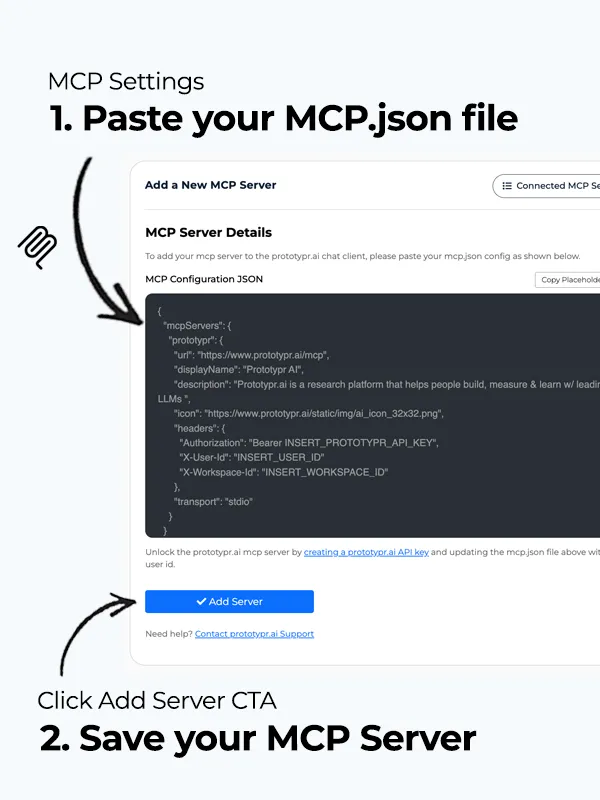
For clients that accept an mcpServers configuration with remote URLs and custom headers, use this as a starting point. Supported fields vary by client.
{
  "mcpServers": {
    "experiments_toolkit": {
      "url": "https://www.prototypr.ai/mcp/experiments-toolkit",
      "displayName": "Experiments Toolkit by prototypr.ai",
      "description": "An experiments toolkit to help you manage your experiments pipeline and search the Experiments Library.",
      "icon": "https://www.prototypr.ai/static/img/ai_icon_32x32.png",
      "headers": {
        "Authorization": "Bearer INSERT_PROTOTYPR_AI_API_KEY",
        "X-User-Id": "INSERT_USER_ID",
        "X-Workspace-Id": "INSERT_WORKSPACE_ID"
      }
    }
  }
}
Security: Treat your API key as a secret. Do not commit it to a repository or paste it into an AI conversation. Use your client's credential storage or environment-variable support where available. User and workspace IDs identify the requested context; they do not replace authorization.
How to Connect a MCP Server to the prototypr.ai MCP Client
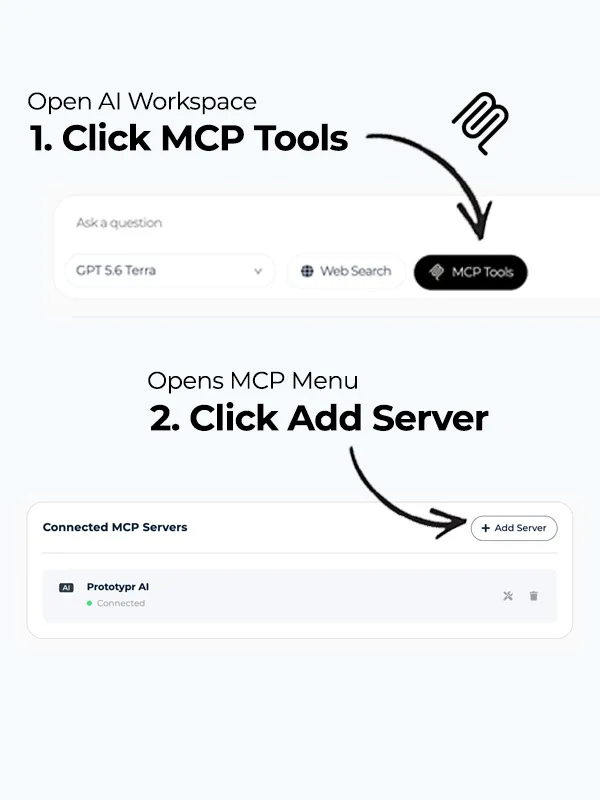
After you have completed the steps above and generated an API key, copy the mcp.json above, navigate to your AI Workspace and open up MCP Tools. Then Click add server as shown below.
Paste in the MCP json as shown above into the server details field and click Add Server.
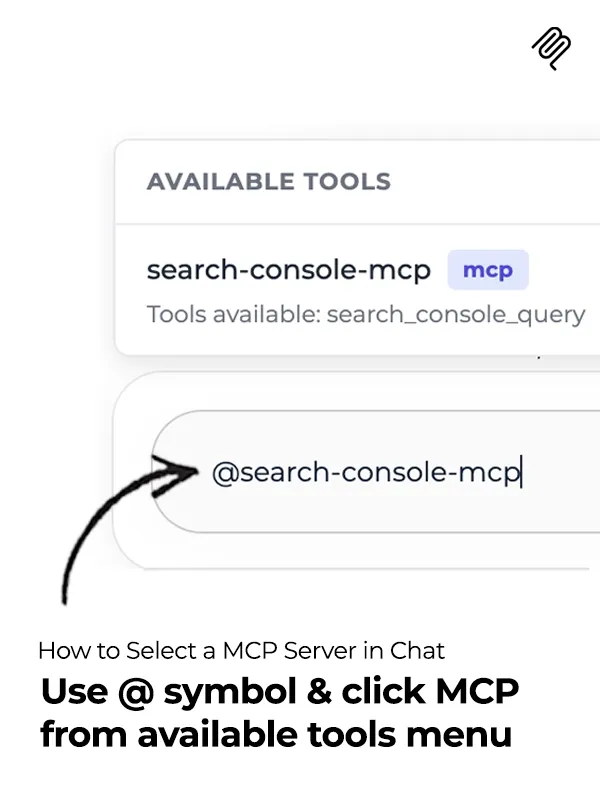
Start chatting with that MCP server by searching for it using the @ symbol a the start of your sentence as shown below.
How to Connect a MCP Server to ChatGPT & Claude
If you'd like to bring this MCP into your own AI workflow using ChatGPT or Claude, please check out the following tutorials that show you how to connect an MCP server:
How to Use the Experiments Toolkit MCP with Prompt Examples
Below are some simple prompts that demonstrate how to use the Experiments Toolkit MCP.
How to Create an Experiment Plan
PROMPT: Please create a new experiment plan with the hypothesis if i change the headline to speak to the value of using generative AI to accelerate the testing and learning process, then I'll grow sign up rates by 20%.
Note: Creating a plan saves a record in prototypr.ai. It does not launch an A/B test or send an email campaign.
How to Review a List of Experiments in your Experimentation Pipeline
PROMPT: Please pull a list of my experiments in my workspace by ID, Title and active state.
How to Update the Results of an Experiment
PROMPT: For experiment INSERT_EXPERIMENT_ID, please update the results to state that the observed improvement was significant. Set hypothesisOutcome to True. Leave the hypothesis, design, tags, and all other information unchanged.
How to Search the Community Experiment Library
PROMPT: Search the external experiment library for examples addressing abandoned ecommerce carts and the strategies and tactics used to re-engage these customers.
How to Share / Publish Learnings to the Experiment Library
PROMPT: Please submit INSERT_EXPERIMENT_ID to the community library for review.
IMPORTANT: Please note that all of your experiments you create and update in your workspace are private to you and your team. If you choose to share an experiment with the prototypr.ai community, please ensure you update your experiment and only share the data you want to. Once shared, it will be submitted to our community moderators for approval and display on the /home page.
Experiments Toolkit FAQ
Compatibility depends on the specific client experience, supported remote transport, and authentication options. This endpoint's example configuration uses custom headers; not every client supports that configuration. Check your client's documentation before connecting. For more details about connecting custom MCPs to Claude or ChatGPT, please check out the tutorials below:
The six tools documented here research and manage experiment records. They do not deploy variations, allocate traffic, send campaigns, or query live analytics. Run tests and collect measurements through your own systems, then record the findings with the toolkit.
If you would like to pull live Google Analytics data, please check out our Custom Google Analytics MCP.
Yes. Creating a plan saves a record, and updating a plan changes selected fields. Sharing learnings submits an experiment for community inclusion. Review the target experiment and requested changes before asking the tool to update the experiment.
No. External experiments can reveal useful mechanisms and inform hypotheses, but their results depend on audience, product, methodology, and context. Validate proposed changes with your own users and measurements.
If you need support setting this Experiments Toolkit up in prototypr.ai, please feel free to reach out to the support team in the app.